WhatsApp AI Agents for Business: Orders, Customer Service and Automatic Reports
How an AI agent differs from a menu chatbot, real uses for orders, customer service and internal operations, how it works, and what to prepare in Indonesia.
In this article
In Indonesia a lot of business runs on WhatsApp: customers order, ask and complain there, and internal teams coordinate in groups. The problem is that all of it is still read, logged and forwarded by hand. A WhatsApp AI agent takes over that repetitive work without asking anyone to move to a new app.
What is a WhatsApp AI agent?
An AI agent is a language-model assistant that works inside WhatsApp. Unlike a menu chatbot, it:
- Understands free-form messages, including everyday Indonesian and abbreviations.
- Asks follow-up questions when information is missing.
- Pulls data from business systems such as stock, prices or order status.
- Takes actions: logs an order, opens a ticket, sends a reminder.
- Hands over to a person when it is unsure or when asked.
| Menu chatbot | AI agent | |
|---|---|---|
| How you talk to it | "Type 1 for…" | Normal conversation |
| Questions outside the menu | Fails | Understood or handed to staff |
| Access to business data | Limited | Reads and updates systems |
| Typical outcome | Shows information | Order logged, ticket opened, report sent |
Three real examples
1. Orders and subscriptions: Le Minerale
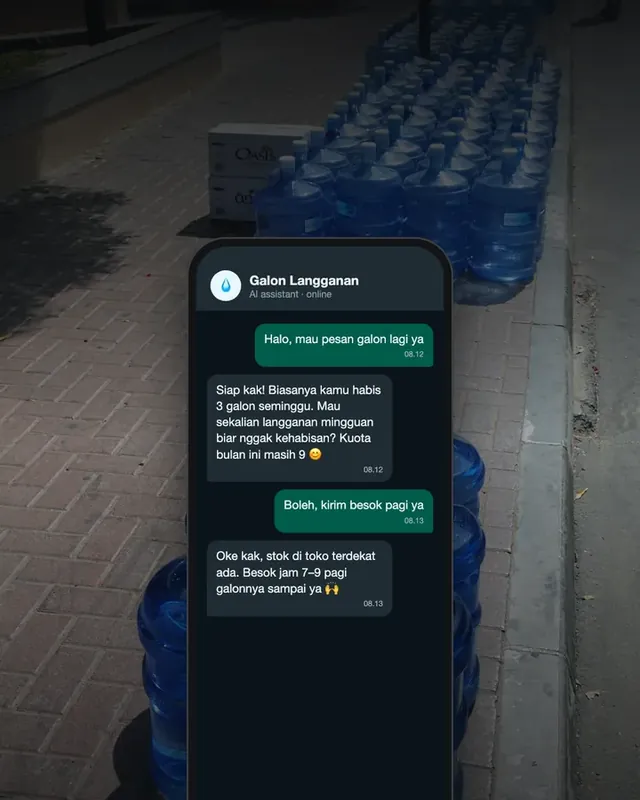
Le MineraleSee the project →Gallon subscriptions, package choices and quotas used to be tracked by hand by partner stores. The WhatsApp AI agent now recommends a package based on the customer's usage, records the choice, checks stock with a nearby partner store and tracks quotas automatically.
2. Internal operations: Bank BTN
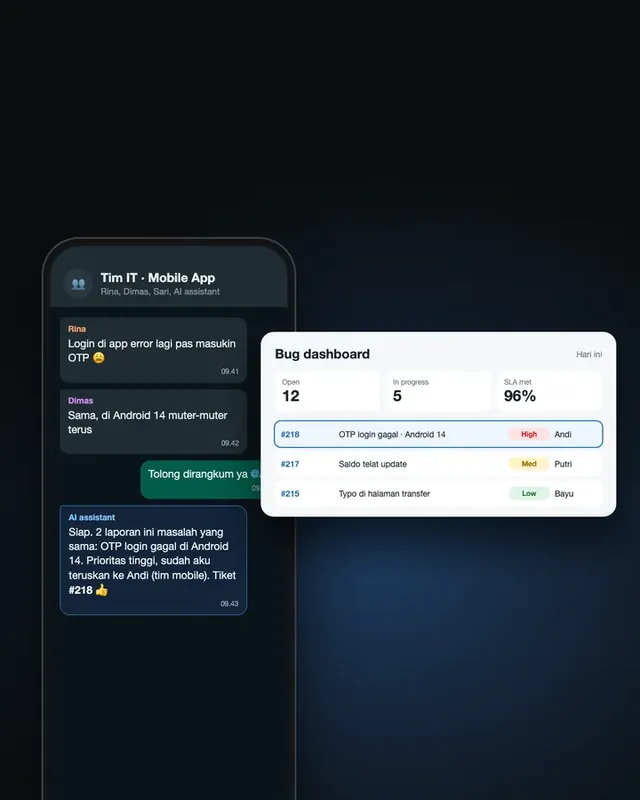
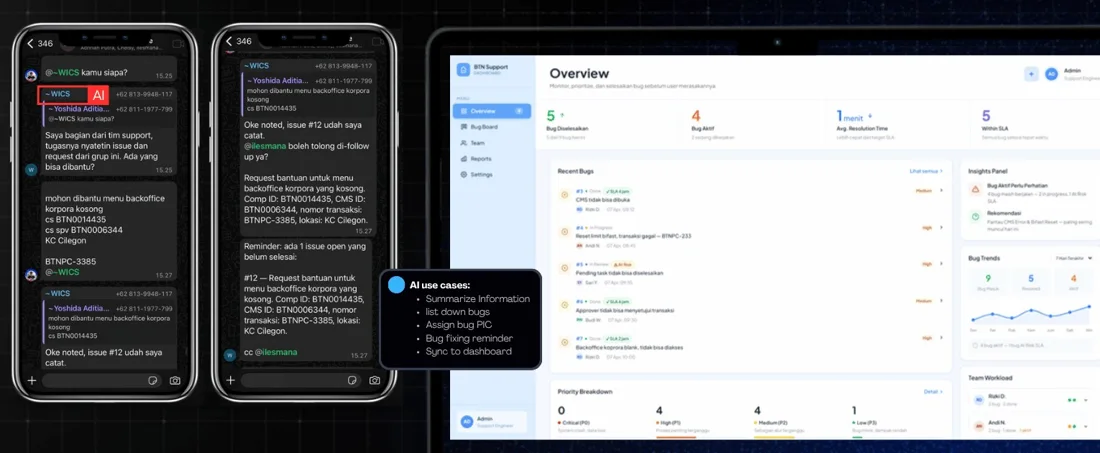
Bank BTNSee the project →Bug reports kept getting lost in busy WhatsApp groups. Mention the AI in the group and it summarises the issue, groups related bugs, assigns the responsible developer and tracks the status, all synced to a dashboard with team workload and SLA tracking.
3. Sales team evaluation
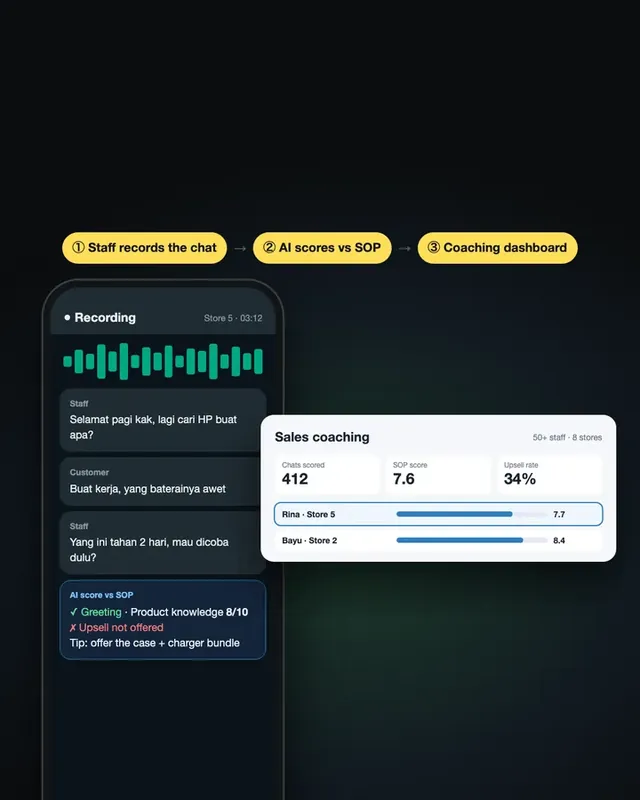
Sales teamsSee the project →From the same AI-for-business family: staff record their offline sales conversations, the AI transcribes and scores each one against a custom rubric, and performance insight appears in one dashboard. In use for 50+ staff across 8+ stores.
How it works
- A message comes in through the WhatsApp Business Platform, Meta's official API.
- The agent works out the intent with a language model and decides what to do.
- It reads or updates data in business systems: stock, orders, tickets.
- It replies in natural language, or hands over to staff.
- Everything is logged in a dashboard: conversations, actions and outcomes.
Use cases that pay off fastest
- Reorders and subscriptions: products people buy again and again, like water gallons, household goods or store supplies.
- Frequent questions: opening hours, locations, order status, how to claim.
- Scheduling: bookings, appointment reminders, attendance confirmations.
- Internal coordination: bug reports, IT requests, field reports from sales teams.
- Automatic reports: a daily summary from conversations, sent to the management group.
What to prepare
- One clear job. Start with one flow, such as reorders, not "every customer question".
- Access to the right data. An agent that is not connected to data will guess, and guessing is risky.
- Firm boundaries. What it may answer, and what goes to staff.
- A handover path to a person, with the conversation history attached.
- Testing with real conversations before opening it to every customer.
- Data compliance. Conversations contain personal data, so UU No. 27 of 2022 on Personal Data Protection applies.
How to measure results
- Time to first response
- Share of conversations resolved without staff
- Orders or tickets logged through the agent
- Staff hours saved per week
- Customer satisfaction after the conversation
Let people stay on WhatsApp. Move the repetitive work to AI.
Got a process still handled by hand over WhatsApp? See our AI for business projects or tell us about the process.
Frequently asked questions
How is an AI agent different from a regular WhatsApp chatbot?
A regular chatbot follows set menus and buttons. An AI agent understands everyday messages, asks follow-up questions, pulls data from business systems and takes actions such as logging an order or opening a ticket, without forcing people through a menu.
Can an AI agent handle everyday Indonesian?
Yes. Modern language models understand informal Indonesian, abbreviations and the mixed language people use in chat. The tone can also be tuned to match the brand.
What do you need to get started?
A WhatsApp Business Platform account (Meta's official API), access to the data the agent needs such as stock, products or order status, clear rules on what it may and may not answer, and a handover path to a person.
What if the AI answers wrongly?
Keep its scope narrow, give it the real data instead of letting it guess, log every conversation, and hand over to staff when it is unsure or when the customer asks. Test it with real conversations before launch.
What about customer data?
WhatsApp conversations contain personal data, so Indonesia's Personal Data Protection Law (UU No. 27 of 2022) applies. Keep only what you need, limit who can access it, and tell customers they are talking to an AI assistant.