Face Recognition Attendance System: How It Works and How to Choose One
How a face recognition attendance system works, what it fixes over fingerprint and manual sign-in, privacy rules under UU PDP, and how to choose one.
In this article
A face recognition attendance system records when employees arrive and leave by matching their face to a registered template. No cards, no PINs, no shared fingerprint reader. For companies with staff across several sites, it answers two questions HR always asks: who is actually here, and who was late.
See our face recognition attendance service.
How a Face Recognition Attendance System Works
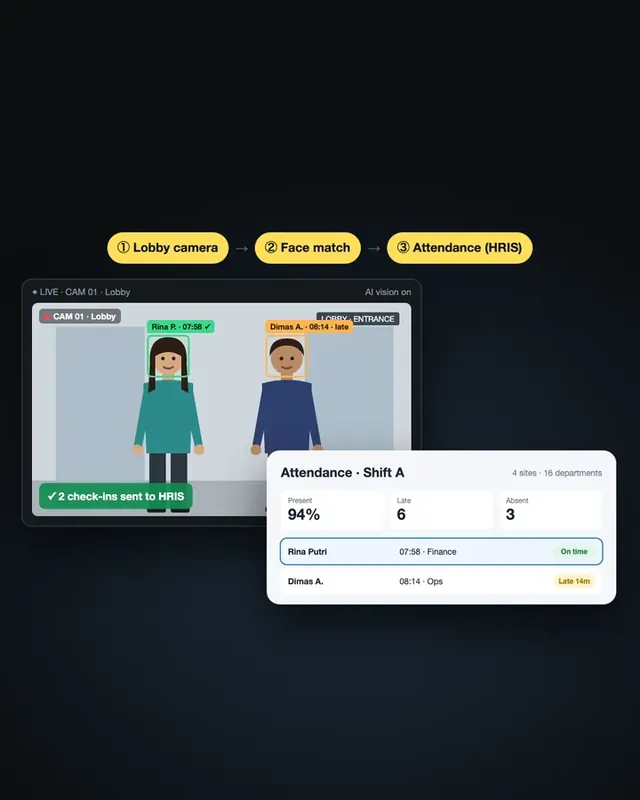
The flow is simple from the employee's side and does more work in the background:
- Enrolment. Each employee registers their face once. The system stores a mathematical template, not just a photo.
- Check-in. A camera at the entrance, a tablet on the wall or the employee's phone captures their face.
- Liveness check. The system confirms a real person is present, not a printed photo or a video on a screen.
- Matching. The face is matched to the right employee and the time and location are logged.
- Rules and reports. Lateness, early leave and missing check-outs are flagged automatically and pushed to a dashboard or exported to payroll.
What It Fixes Compared with Other Methods
| Method | Common problem | With face recognition |
|---|---|---|
| Paper sign-in sheet | Easy to fill in for someone else, slow to recap | Every check-in is tied to a face, time and place |
| ID card or PIN | Cards and PINs get shared or lost | Nothing to share, nothing to lose |
| Fingerprint reader | Needs touch, fails on dirty or worn fingers | Contactless and quick at busy entrances |
| Manual spreadsheets per site | HR waits until month end for data | One live view across every location |
The biggest win is usually buddy punching, where one employee checks in for another. With a face as the credential, that stops almost overnight.
A Real Project: Attendance Across 16+ Departments
One workforce client came to us because manual attendance across many sites was slow and easy to fake. We built a facial recognition system that records attendance, flags lateness automatically and gives supervisors real-time insight across locations.
The system covers 50+ employees in 16+ departments. Instead of collecting sheets from each department, supervisors see attendance as it happens, and HR works from one clean data set.
Privacy and UU PDP
Under Indonesia's Personal Data Protection Law, UU PDP No. 27/2022, biometric data such as facial images is classified as specific personal data. That means extra care:
- Tell employees exactly what is collected, why, and for how long.
- Get consent or rely on another lawful basis, and document it.
- Store templates encrypted, with access limited to the people who need it.
- Delete data when an employee leaves or when the retention period ends.
- Use the data for attendance only, not for unrelated monitoring.
Designing this in from the start is far easier than fixing it after rollout.
How to Choose a Face Recognition Attendance System
Ask these questions before you commit:
- Liveness detection: does it reject photos and screens?
- Multi-site support: can it handle many locations, shifts and departments in one dashboard?
- Device options: wall tablets, fixed cameras, mobile check-in with GPS, or a mix?
- Offline mode: does it keep working when a site loses internet, then sync later?
- Integrations: can it export to your HR or payroll system?
- Data location and security: where are the face templates stored, and who can access them?
- Custom rules: can it follow your own shift patterns, grace periods and lateness policies?
Off-the-shelf apps fit simple offices. Companies with several sites, field teams or their own HR rules usually get more from a system built around how they already work.
How to Start
- Pick one or two sites with clear attendance problems.
- Write down the rules: shifts, grace periods, what counts as late.
- Run a short pilot with real employees and real lighting conditions.
- Check accuracy and adoption, then roll out site by site.
Want to plan a pilot for your team? Talk to us.
Frequently Asked Questions
What is a face recognition attendance system?
A face recognition attendance system records employee check-in and check-out by matching a live camera image of the face to a template registered for that employee. It replaces paper sheets, ID cards and fingerprint readers with a contactless scan.
How accurate is face recognition attendance?
Modern systems are reliable in normal office and site conditions when they use good cameras, consistent lighting and liveness detection. Accuracy should be tested on your own staff and locations during a pilot before rollout.
Can employees cheat face recognition attendance with a photo?
Not when the system includes liveness detection, which checks that a real person is in front of the camera rather than a printed photo or a screen.
Is face recognition attendance legal in Indonesia?
Yes, but facial data counts as biometric, specific personal data under UU PDP No. 27/2022. Companies need a clear purpose, employee consent or another lawful basis, secure storage and a defined retention period.
What is the difference between face recognition and fingerprint attendance?
Face recognition is contactless, faster at busy entrances and harder to share. Fingerprint readers need physical contact and can struggle with dirty, wet or worn fingers, which is common on industrial sites.
Sources
Project figures from rekursiv case studies
- AI face-recognition attendance Workforce